
User activity and timeline
Targeted, not a walk
Section titled “Targeted, not a walk”The activity module does not crawl the disk. It looks up the paths where each operating system keeps its records – case-insensitively, wherever the system root is – and reads only those. A full Windows XP image is read in a few seconds.
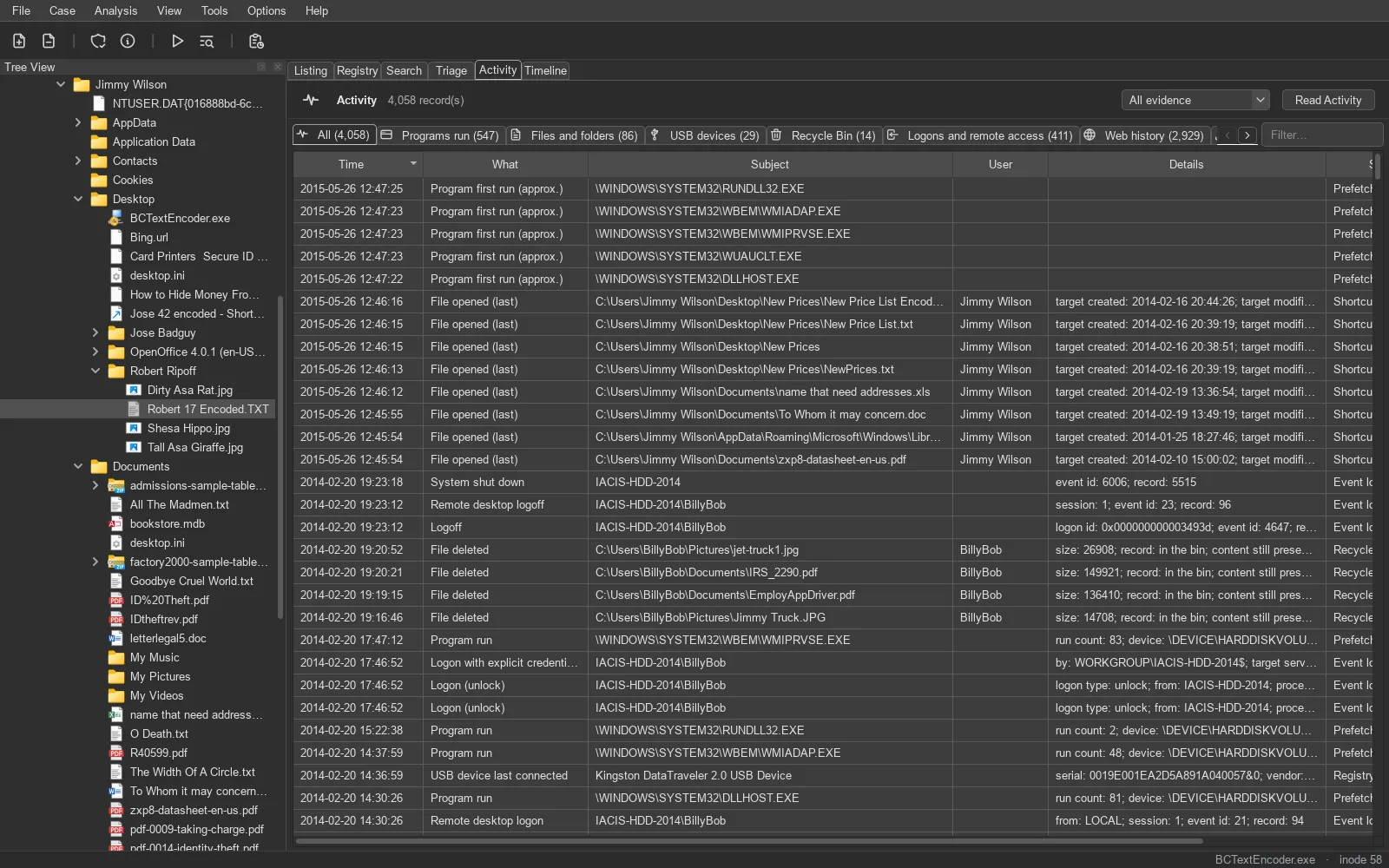
Every record has the same shape: category, source, time, what happened, subject, user, details, and the file it came from – so a single click previews the source artifact and a double-click goes to it.
What is read
Section titled “What is read”| Category | Sources |
|---|---|
| Programs | Prefetch (Windows XP to 11, compressed included), Amcache, Shimcache, UserAssist, BAM, RunMRU, PowerShell history and script-block logging (event 4104), bash / zsh / fish history |
| Files and folders | ShellBags, LNK shortcuts, Jump Lists, RecentDocs, TypedPaths, Office recent files, macOS recent items and shared file lists, FSEvents, recently-used.xbel |
| USB devices | USBSTOR, DeviceClasses, MountPoints2, setupapi logs |
| Logons | Windows event logs (logons, sessions; service and machine accounts left out), Linux journal, syslog, wtmp/utmpx |
| Browsers | Chrome, Edge, Brave, Vivaldi and other Chromium browsers, Firefox, Safari, Internet Explorer (WebCache and index.dat) – history and downloads |
| Searches | WordWheelQuery (what was typed into Explorer’s search box) and search-engine searches from browser history |
| Network | NetworkList profiles, SRUM connectivity, Wi-Fi networks on iOS and Android |
| Usage | SRUM application, network and energy use; macOS KnowledgeC |
| Communication | Skype, iMessage and SMS, WhatsApp (iOS and Android), Android and iOS call logs and contacts |
| Cloud | OneDrive, Google Drive |
| Antivirus | Microsoft Defender detection history, MPLog, and quarantined files (decrypted in memory) |
| Recycle Bin | $I / $R (including deleted $I records of an emptied bin) and XP’s INFO2 |
| System | time zone, installed programs, Windows version, macOS install history, phone accounts and builds |
Windows Timeline (ActivitiesCache.db), SRUM and WebCache are read from their own databases – ESE through libesedb, SQLite through TRACE’s reader, which applies a write-ahead log’s committed frames first.
Deleted records, recovered
Section titled “Deleted records, recovered”SQLite keeps deleted rows in free pages and freeblocks until they are overwritten. TRACE recovers them – from freelist pages, freeblocks, the gaps between cells, and a WAL’s older frames – and keeps a candidate only if it decodes as a row of one of the database’s own tables and exactly fills its cell. Recovered Skype and iMessage messages, Android SMS and Chromium and Firefox history appear as Deleted … (recovered).
Its own parsers, checked against references
Section titled “Its own parsers, checked against references”Prefetch’s LZXPRESS Huffman compression, EVTX binary XML, shell items and LNK files, Linux journals (including zstd-compressed fields), Android’s binary XML (ABX) – each parser is TRACE’s own, and its output is compared in the tests with the values plaso, python-evtx and other references publish for the same files.
The timeline
Section titled “The timeline”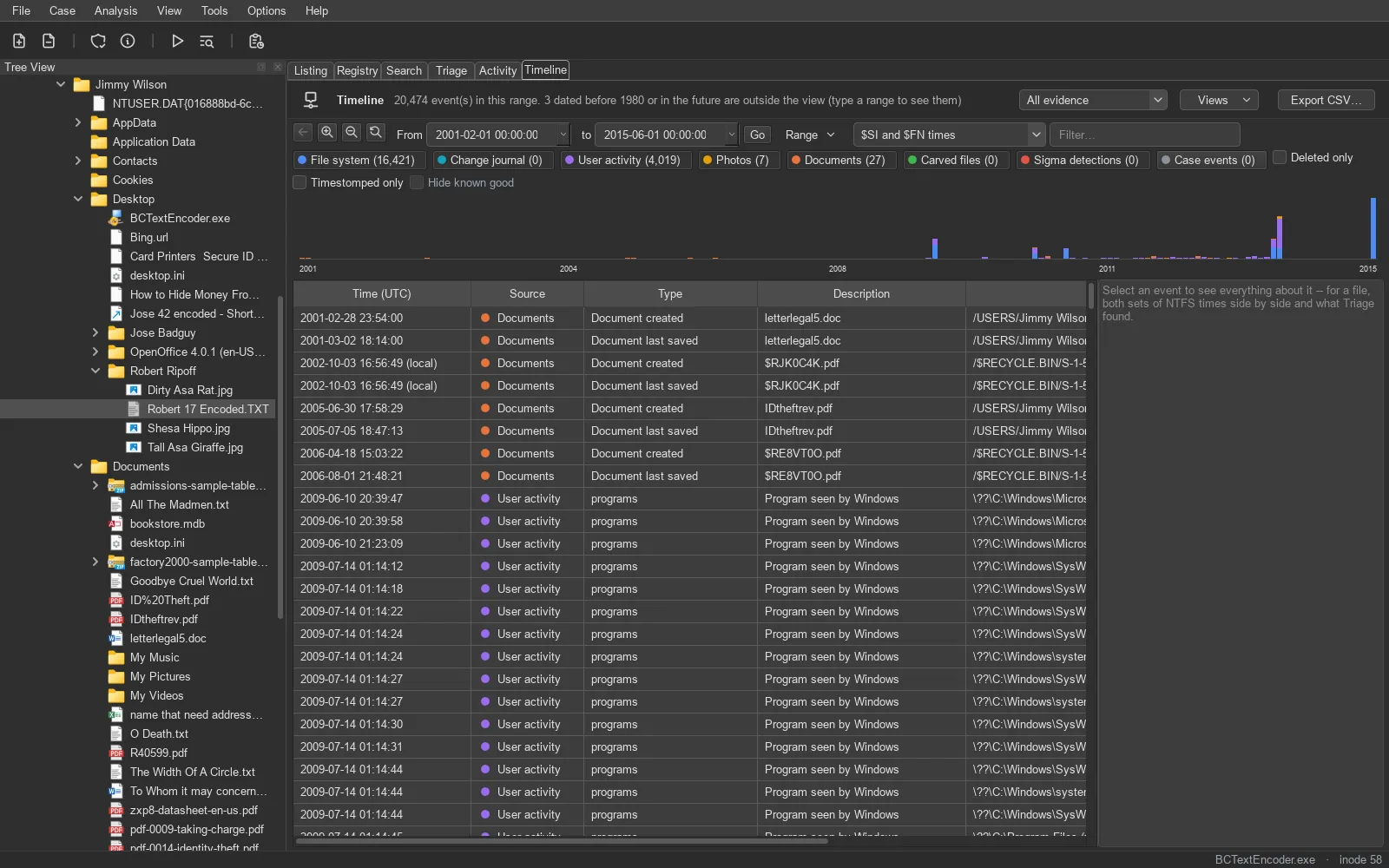
The timeline merges eight sources into one list: file-system times ($STANDARD_INFORMATION and $FILE_NAME separately on NTFS), the change journal ($UsnJrnl), user activity, photo EXIF times, document metadata times, carved files, Sigma detections and the case’s own events. Filter by time range, source, user, folder and text – or only deleted files, only timestomped ones, or without known-good files – with a histogram on a square-root scale so quiet days still show. Add to Report picks rows for the report.
The Recycle Bin, linked
Section titled “The Recycle Bin, linked”A Recycle Bin record names its $R content file; if that file is deleted too, TRACE links the record to the deleted file’s entry, so one click previews what was binned – even when the bin was emptied.